
Everything a school office does, in one system
More than 25 modules that share the same student records. The features are the same whether you install SchoolAdminCE on your own computer or use it in the cloud.
Admissions and student records
From the first enquiry to the transfer certificate, one record follows the student.
Student admissions
Manage new and returning admissions with streamlined forms, class-wise enrolment tracking and document verification. Assign roll numbers, print admission reports and keep the full admission history.
Pre-admission
Handle enquiries and registrations before the student is admitted, with a list of applicants you can follow up.
Student information
A compact student form with a fixed photo column, smart suggestions for city, state and country, and default values so repeat fields fill themselves.
Student import
Import your existing student list instead of entering students one by one.
Student reports
Class lists, admission and re-admission counts and other student reports, exportable to Excel and PDF.
Photo manager
Take student, parent and teacher photos with a webcam and save them straight to the record.
ID cards
Print student and employee ID cards in horizontal or vertical layouts, with placeholders such as mother’s name.
Transfer certificates
Keep separate TC formats for primary, middle and high school and print them from the student record.
Fees and accounts
Every rupee collected at the counter is receipted, totalled and visible the same day.
Fee payment
Class-wise fee structures, concessions, instalments and dues. The student’s photo shows on the payment screen so the cashier knows who is paying.
Fee dues
See who owes what, by class or by student, and send reminders for the balance.
Branded receipts
Customise fee receipts with your school’s name and header, even one design for the school and another for the society. Each receipt shows the exact dues remaining.
UPI QR code on receipts
Receipts and the payment screen can carry your UPI QR code, so parents pay by scanning.
Fifteen payment modes
Cash, cheque, DD, NEFT, UPI, Google Pay, PhonePe, Paytm, credit and debit card, net banking and more, each colour-coded and totalled separately.
Cashier-wise collection
See what each login collected, broken down by payment mode, with a grand total across all cashiers.
Receipt numbering
Number receipts by fee group or by academic year, whichever your auditor prefers.
Transport and monthly fees
Collect transport and monthly fees for the months you choose, and switch a student’s transport on or off at any time.
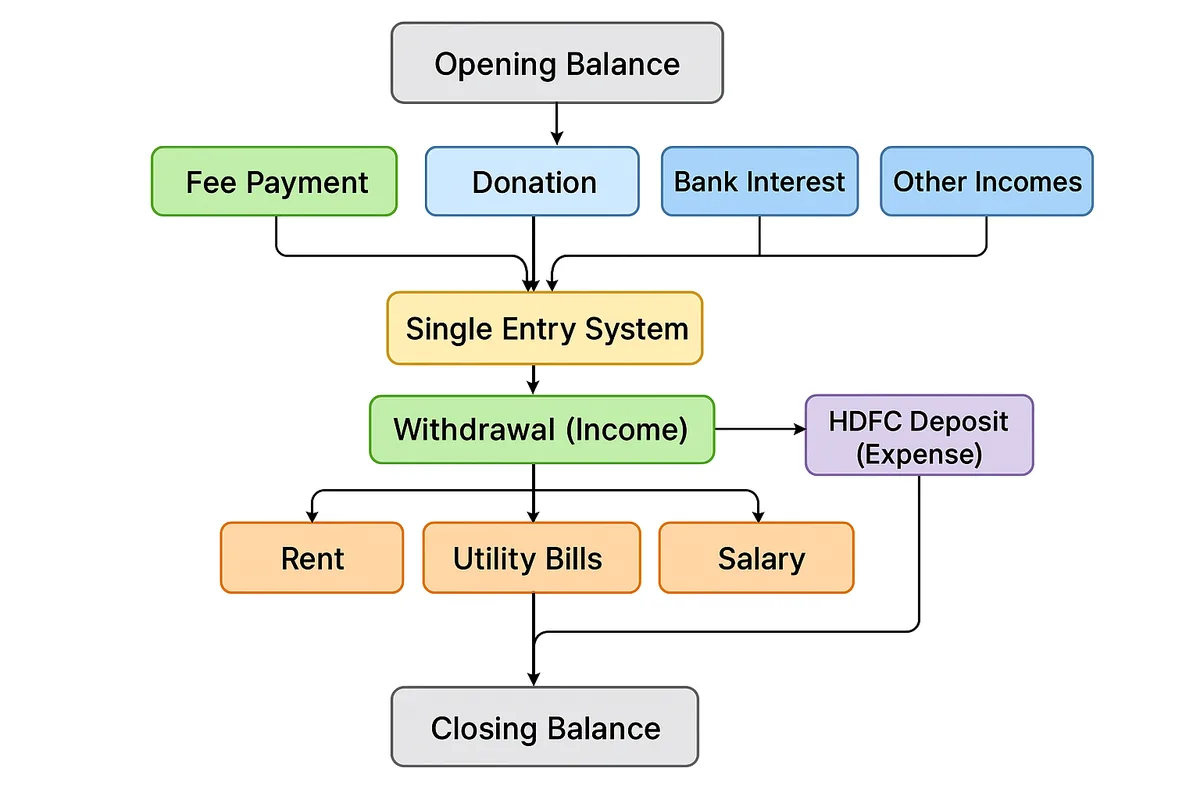
Cash Master daybook
A single-entry cash book that posts fee income automatically, records other income and expenses, handles bank deposits and withdrawals, and carries opening and closing balances across years.
Expenses
Record rent, salaries, utilities and other payments as cash-out entries, print payment vouchers as PDF, and see the expense summary and the income and expense statement.
Fee and expense graphs
Fee payment and expense graphs show collection and spending at a glance.
Exams and report cards
Marks entered once become report cards, graphs and hall tickets.
Examinations
Plan exams, set term-wise and subject-wise assessments, and choose maximum and minimum marks per exam.
Report cards
Personalised report cards in CBSE, ICSE, State Board and custom grading formats, with consolidated and term-wise templates and CGPA.
Automated grade calculation
Grades and totals are worked out from the marks entered, so nothing is added up by hand.
Hall tickets
Print hall tickets class-wise, on half an A4 sheet if you want to save paper.
Performance graphs
See a student’s results by test, term and subject as graphs.
Elective subjects
Assign up to eight elective subjects per student.
Attendance
Who is in school today, for students and staff, without a paper register.
Student attendance
Mark daily attendance and see it reflected on the report card.
Staff attendance
Keep attendance for teaching and non-teaching staff alongside their records.
Biometric attendance
Sync attendance for students and staff directly from eSSL and ZK biometric devices.
Absentee alerts
Absentee SMS alerts go to parents the same day.
Attendance graphs
See attendance trends as graphs instead of counting register pages.
Parent and staff communication
Parents and staff hear from the school before they have to ask.
SMS and email alerts
Send messages with templates and variables, check balance and keep a log of everything sent.
Transactional emails
Automatic emails for fee payments, fee dues, birthday reminders, holidays and events.
WhatsApp messages
Send individual WhatsApp messages, birthday greetings and fee reminders.
Parents module
Parents see notices, assignments, events, holidays, fee alerts and exam schedules on mobile, tablet, laptop or desktop, even when the school runs offline.
Chat
A chat module for conversations inside the school community.
Video conferencing
Built-in online classes powered by Jitsi Meet. Schedule a class, send email invitations and keep track of every session.
Campaigns
Create email, WhatsApp and SMS campaigns and track who received them, who read them and who acted.
Holiday calendar
Import your country’s public holidays straight into the school calendar.
Staff and payroll
Staff records, attendance, payroll and logins from one staff list.
Staff information
Staff records with alphanumeric employee IDs and a birthday reminder on the dashboard.
Staff import and reports
Import your staff list and print staff reports, including Excel exports with employee IDs.
Staff attendance
Record staff attendance by hand or sync it from eSSL and ZK biometric devices.
Staff payroll
Run payroll from the same staff records.
Employee ID cards
Print ID cards for staff from their records and photos.
User roles
Give each person a login and a role, so they see and change only what their job needs.
Multiple users
Several people work at the same time, each with their own login. Up to 200 simultaneous users are supported.
Library, transport and the rest of the office
The parts of school administration that never make it into a brochure.
Library
Manage books, issues, returns and fines, and import your existing book list.
Transport
Transport fee collection and due reports that export to Excel and PDF.
Inventory
Keep track of stock and school assets.
Reports and graphs
Student count, fee, attendance and expense graphs, plus reports for every activity, exportable to Excel and PDF. Change any template yourself using OpenOffice.
Default settings
Set the school’s default configuration once, so new records start with the right values.
Backup and restore
Back up data and photos, restore on any PC, and recover automatically after a power cut.
Multi-school and multi-campus
The Cloud edition manages several schools or branches from one account, with a separate login for each school.
AI assistant
Ask questions about your school’s data in plain language and get the answer without building a report.
More tools
Visitor Manager, Contact Manager, Activity Book and Barcode tools are also part of the product. Ask us for a walkthrough of any of them.
Which edition has which features
Free, Solo (Offline) and Cloud include every module. Starter covers student records and fees.
Every module is switched on in the free edition
SchoolAdminCE is free for up to 50 students, with every module switched on. Install it, enter one class, collect one day of fees, and decide from there.