
The school in every parent’s pocket
Attendance, homework, fees, marks, holidays and notices from SchoolAdminCE, on any phone. Parents scan your school’s QR code, type their mobile number and get a code on WhatsApp. No app store, no password.
Open at saapp.in · also mobile.marvelsoft.co.in
What parents see
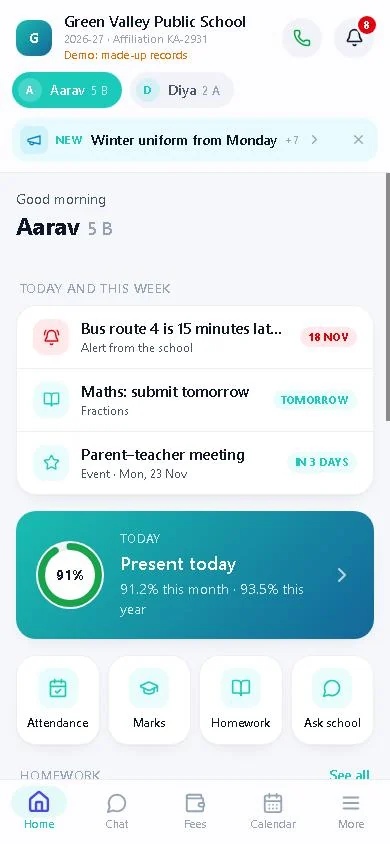
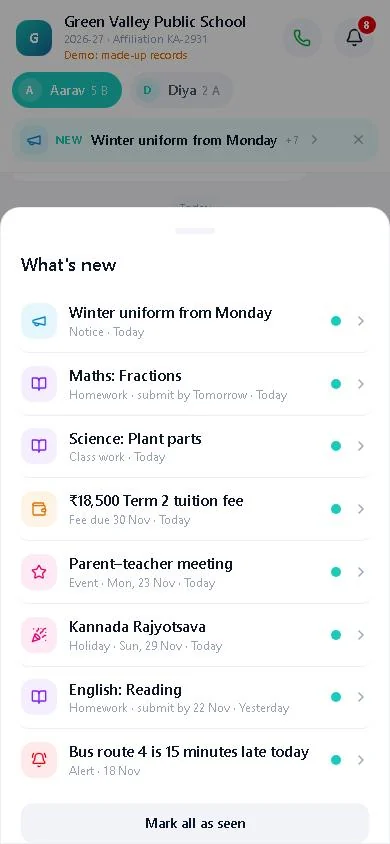
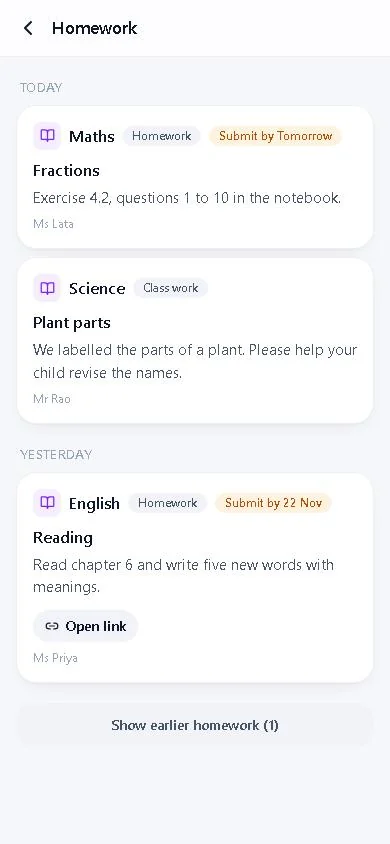
Screens from the demo app, with a made-up school. Every parent sees only their own children, with a tap to switch between brothers and sisters.
Everything in the app
All of it comes from what the school office already enters in SchoolAdminCE. Nothing is typed twice.
Today and this week
The home screen puts today first: present or absent, homework due, a holiday tomorrow, an event in three days. Past holidays, events and homework step aside.
Attendance
Today’s status, the month and the year in percent, and a calendar of every day marked.
Homework and class work
Subject, teacher, what to do and the date to submit by, with links and pictures from the teacher.
Fees and UPI
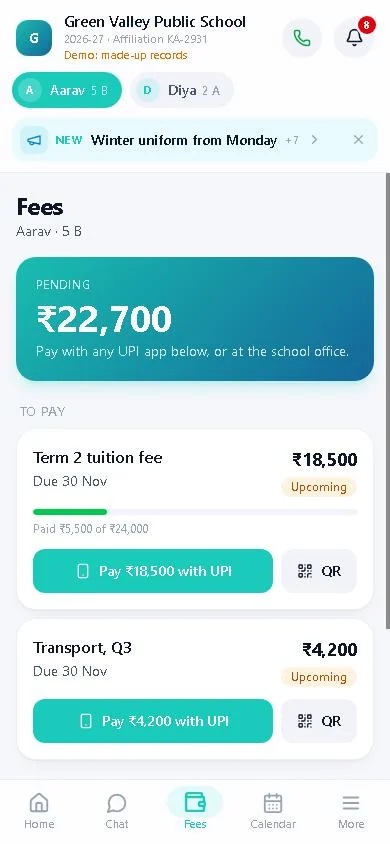
Pending fees with due dates, payments and receipts. Pay with GPay, PhonePe, Paytm or any bank app, with the amount filled in.
Marks
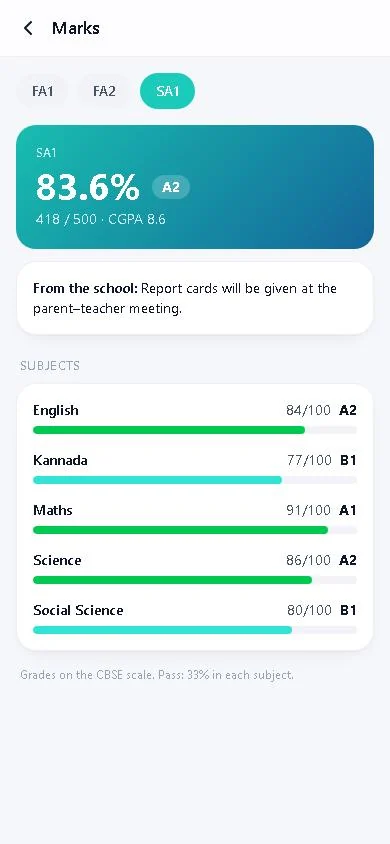
Only the exams the school publishes: FA and SA marks, grades, percentages and remarks.
Holidays and events
The school calendar, with this week’s days marked “Today”, “Tomorrow” or “In 3 days”.
Notices and alerts
The noticeboard and urgent alerts, with any link or picture the school attached, kept inside the card.
The bell
A count of what is new since the parent last looked, and the newest item right under the header.
Ask the school
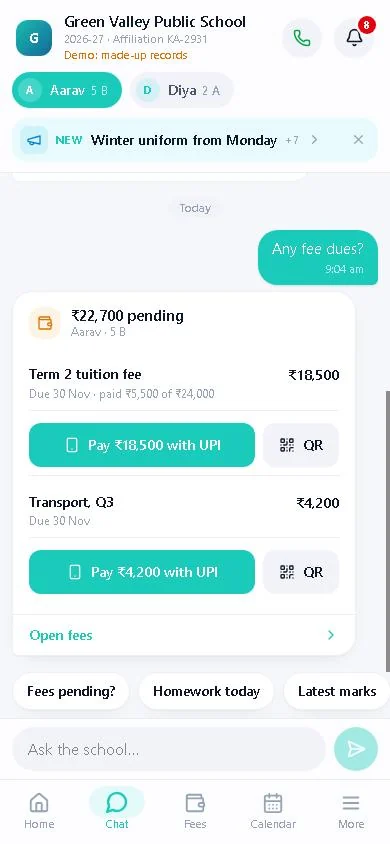
eKTextAI answers from the school’s own records and circulars, in short cards that fit a phone. WhatsApp chats with the school show here too.
Student profile
Class, roll no., admission no. and date, blood group, parents’ names and work.
School contact
The school’s logo and colour, affiliation no., academic year, a call button, email and directions.
Works everywhere
Phones, tablets and computers. Add it to the home screen; it opens fast and shows the last records even with a weak signal.
How parents register
The school shares one QR code. That is the whole registration.
- The school shares its QR code. Print it on a circular, the admission form or the fee receipt, put it on the notice board, or post it on the class WhatsApp group.
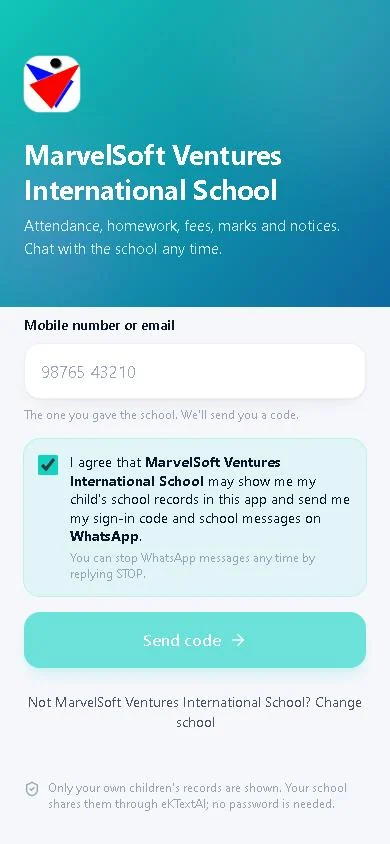
- The parent scans it. The app opens with the school already chosen, showing its name and logo. (Without the QR code, parents type the 6-letter school code.)
- They type their mobile number or email, the one the school has on file, and tick “I agree” to see the records and get messages on WhatsApp.
- A 6-digit code arrives on WhatsApp (or by email). They type it in, and their children are there.
Nobody outside the school’s records can sign in: a number that is not on an active student’s record gets no code. There is no sign-up form and no password to reset.

Try it now. Scan this with your phone to open the demo app, or open saapp.in/?demo=1. Your school’s own QR code opens your school instead.
School settings in SchoolAdminCE
Everything is set in SchoolAdminCE 2026.0.3 and later. The records reach the app through eKTextAI, so the school PC can stay offline most of the day.
Push Everything NowPush NoticesPush Who Can Sign InCheck Sync State
- Set the school code once. On School Profile › Parent App, type the 6-letter code and save. It is then locked; only Settings › K V Config can change it, so a printed QR code never stops working by accident.
- Push the records. Push Everything Now sends students, attendance, homework, marks, fees, holidays, events and notices through eKTextAI. Marks go only for exams ticked Publish.
- Print or share the QR code from the same tab. SchoolAdminCE draws it itself, with no outside website.
- Decide who can sign in. Every active student’s parents can, unless the student’s parent login under Users is switched off.
App settings in K V Config
Settings › K V Config › MOBILEAPP_CONFIG lists every app setting with its default, so nothing has to be typed by name.
| Key | Default | What it does |
|---|---|---|
orgId | set once on the Parent App tab | The school code parents use |
parentAppUrl | https://saapp.in | The address in the app link and QR code |
orgTheme | blank | The app’s colour, for example #0d9488 |
logoUrl | blank | Logo address; blank sends the logo saved on the School page |
schoolId | blank | Affiliation no. shown under the school name |
PASSWORDSMS, PASSWORDEMAIL | false | Old app: send login passwords by SMS or email |
UPI payments use the same Fee settings as the receipt QR code (upiId, upiBank, upiName). A link written as url:https://…; in a holiday, event, notice or homework shows in the app as a link, or as a picture.
What is better than the old SchoolAdmin parent app
The new app keeps what parents used in the old one (attendance, homework, fees, marks, events, holidays, notices, the school’s colour and logo, and the student profile) and changes how it reaches them.
| Old parent app | New Parent App (2026.0.3) | |
|---|---|---|
| Where it runs | A separate mobile web server that SchoolAdmin pushed to | One address for every school, saapp.in; the school’s QR code opens the right school |
| Signing in | A username and password, sent to the parent by SMS or email when the parent login was made | Mobile number or email on file, and a one-time code on WhatsApp or email. No password |
| Consent | Not asked | “I agree” before any code is sent, recorded on each child, WhatsApp opt-in and STOP |
| How data travels | Over plain HTTP to that server’s address and port, so the server had to be kept running | Through eKTextAI over HTTPS; the school PC can be offline |
| Questions | Call the school office | Ask the school: eKTextAI answers from the school’s own records, as cards |
| Fees | Payments and receipts | Pending fees too, with Pay with UPI and a QR code drawn inside the app |
| What’s new | A bell menu | A bell that counts what is new since the parent last looked; the newest item is one tap away |
| School look | The school’s colour and logo | The same, plus affiliation no., academic year, a call button and directions |
New in 2026.0.3
- Parent App tab in School Profile, with the school code, the app link, a demo link and the QR code.
- School code locked once set; K V Config lists every
MOBILEAPP_CONFIGkey with its default. - Consent before the code, recorded in eKTextAI once the parent proves the number.
- School logo, colour, affiliation no. and address sent from SchoolAdminCE.
- Student profile: roll no., admission date, blood group, parents’ names and work. Date of birth, income, home address and phone numbers are not sent.
- UPI links on every pending fee, with the balance and a note naming the fee and the student.
- Links and pictures on holidays and events, as on homework and notices.
- Chat answers as cards for fees, payments, marks, attendance, homework, holidays, the profile and the school contact.
- The bell, “Today and this week”, and past items tucked away.
Videos for schools and parents
Short videos on setting up the app in SchoolAdminCE and using it as a parent.
Related
Questions about the Parent App
Do parents have to install anything?
Is there a password for parents to remember?
Our SchoolAdminCE runs offline. Can we still use the app?
Who can sign in?
How is parent consent taken?
What does it cost?
Give parents the app this week
Install SchoolAdminCE 2026.0.3, set your school code, push the records and share the QR code.